SQL संपादक
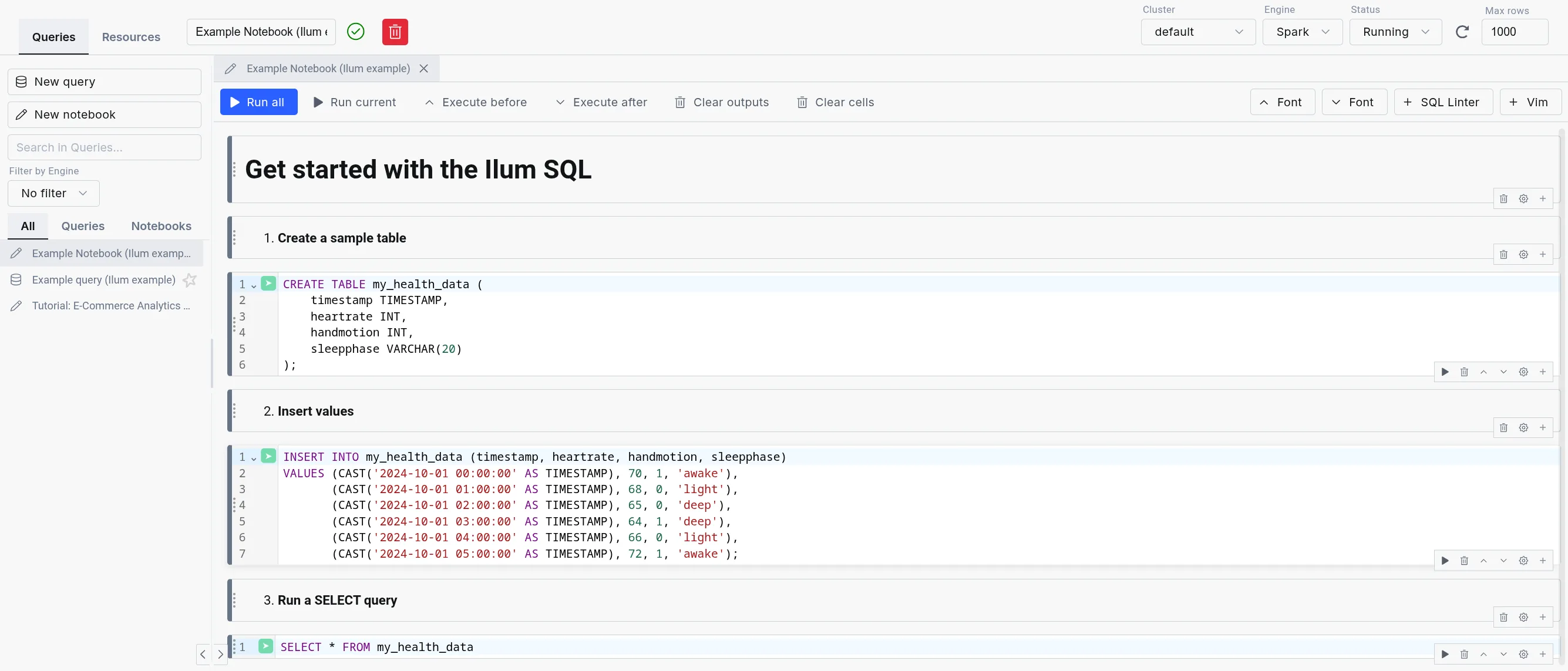
The Ilum SQL संपादक (formerly SQL संपादक) is the in-product workbench for running SQL across every engine Ilum supports: अपाचे स्पार्क, त्रिगुण, डकडीबीऔर Apache Flink. Queries execute through the Apache Kyuubi SQL gateway, with DuckDB integrated as an in-process engine for the lowest possible latency.
Designed for simplicity, the SQL Editor offers an intuitive interface for running queries, exploring data, and gaining insights quickly without writing Scala or Python code.
It is highly configurable through the UI or Helm deployment values, allowing flexibility in, for example, choosing a different table format, like Delta Lake, Apache Hudi, or Apache Iceberg, and in routing queries between engines.
Multi-engine workbench
The SQL Editor exposes the full multi-engine surface of Ilum:
- Engine Selector: Dropdown in the editor toolbar for choosing Spark, Trino, DuckDB, or Flink (when enabled). Live status indicators show the health of each engine.
- Engine lifecycle controls: Start, stop, and restart engines from the UI without leaving the editor. Useful for cycling a Trino coordinator or releasing a Spark session.
- Dialect transpilation: Translate queries between Spark SQL, Trino SQL, DuckDB SQL, and Flink SQL using the built-in transpiler. Useful when promoting an exploratory DuckDB query to a Spark batch job.
- Automatic engine routing: When enabled, the engine router selects the best engine for each query based on data size, workload type, and locality. User selection always overrides the router.
- In-app SQL notebooks: Persistent multi-cell notebooks with per-cell execution, profiling, and visualization, alongside single-query mode.
- Saved queries: Folder-organized query library with bulk operations and a move dialog for reorganization.
- Results tabs: Data, Logs, Statistics, Plan, Export, Visualization. Column-level profiling shows histograms, null counts, and cardinality.
For details on each engine, refer to the Execution Engines documentation.
यह आपकी मदद कैसे करेगा?
The SQL Editor is a powerful tool for reporting and debugging during application development. Instead of building an entire Spark SQL program to query your tables, you can submit SQL statements directly within Ilum's interface.
For debugging, the SQL Editor is invaluable. It eliminates the need to repeatedly write, compile, and submit code like:
val डेटासेट = उत्तेजक गुण.एसक्यूएल("select ...")
इसके बजाय, आप हर बार सत्रों को फिर से बनाए बिना SQL कथनों का इंटरैक्टिव रूप से परीक्षण कर सकते हैं।
Beyond query results, the SQL Editor offers data exploration and visualization tools, along with logs and execution statistics, giving you deeper insights into the query process.
The SQL Editor is also integrated with all four Ilum data catalogs (Hive Metastore, Project Nessie, Unity Catalog, and DuckLake), which means that you can seamlessly query data from previously created tables.
Get started with the SQL Editor
To use the SQL Editor, you need to deploy Ilum with the SQL feature enabled. For setup instructions, refer to the उत्पादन पृष्ठ.
Once set up, the SQL Editor should be available on the sidebar. Inside, Apache Spark and DuckDB are available as engines by default; Trino and Flink can be enabled per deployment.
Ilum loads in example queries and notebooks to help new users get started quickly.
Example query and notebook loading सक्षम है by default.
However, you can disable it by setting ilum-core.examples.sqlQuery=false (disables loading queries) and
ilum-core.examples.sqlNotebook=false (disables loading notebooks) in the Helm chart values.
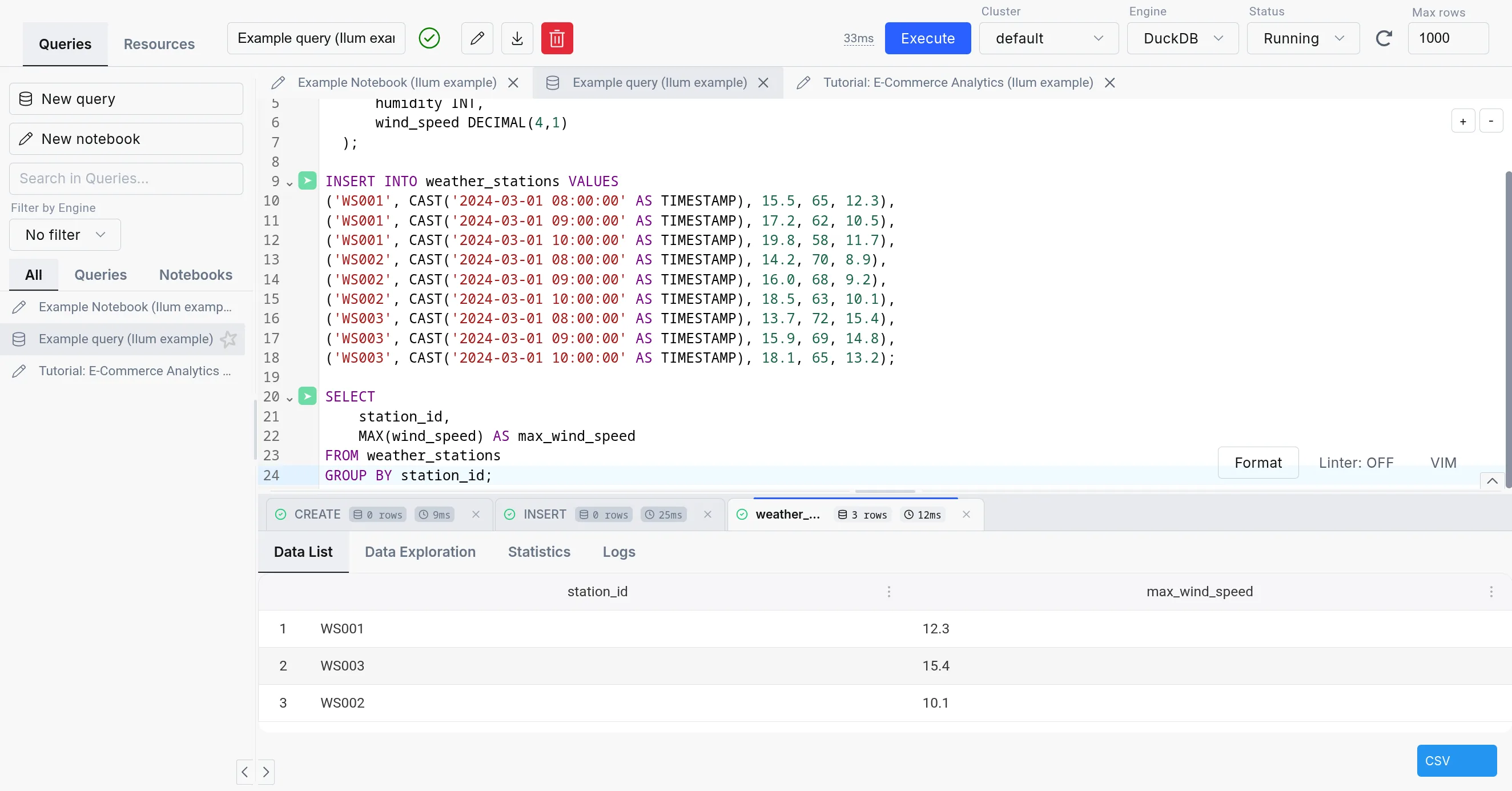
The SQL Editor consists of three parts:
-
SQL query editor: The center part of the SQL Editor, which allows you to write and execute SQL queries. It comes with a simple text editor in the query mode and a notebook-like interface in the notebook mode.
-
The sidebar: Contains your different SQL queries and notebooks in the "Queries" tab, the engine list and lifecycle controls in the "Engines" tab, and a mini version of the टेबल एक्सप्लोरर in the "Resources" tab.
-
The output: Appears in the bottom part of the screen when you execute a query. It has tabs for Data, Logs, Statistics, Plan, Export, and Visualization, plus column-level profiling.
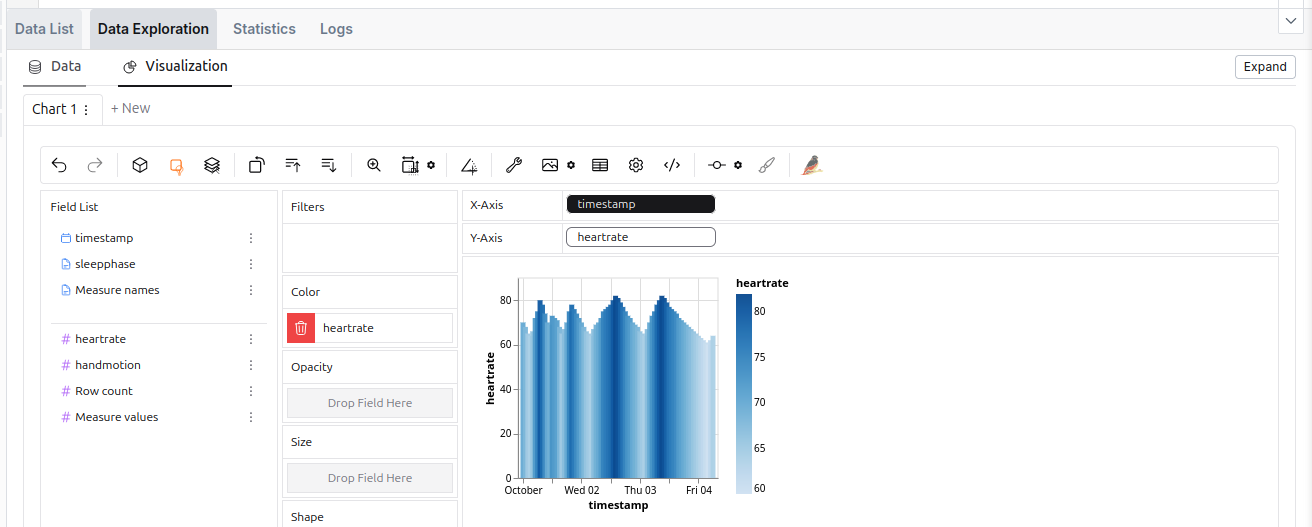 The data exploration tool in the SQL Editor.
वैकल्पिक इंजन
The SQL Editor supports four engines: अपाचे स्पार्क, त्रिगुण, डकडीबीऔर Apache Flink. For an in-depth comparison, refer to the Execution Engines overview.
| स्पार्क एसक्यूएल | त्रिगुण | डकडीबी | |
|---|---|---|---|
| परिनियोजन | On cluster and dynamic | On cluster | Embedded |
| उपयोग का मामला | ETL, Big data processing | Interactive analytics | Interactive analytics, medium-data ETL, prototyping |
| Storage Support | Comprehensive (with additional JARs) | Sufficient | Lacking (but quickly expanding) |
| Concurrency | High (with tuning) | Very high | Limited |
| Performance | Good for large datasets (with tuning) | Good | Good |
| Overhead | Very high | Medium (always-on coordinator) | Very low (in-process) |
| Lineage support | Extensive | Existing (harder to configure) | With custom extension (supported in Ilum) |
| तानाना | Easy (big extension ecosystem) | Moderate (smaller extension ecosystem) | Limited (smaller extension catalog, C++ based) |
While using the Spark SQL engine will ensure compatibility with most Ilum components, we recommend checking out the other options since they offer a much better ad-hoc query experience than Spark SQL.
When changing an engine, your tables might be accessible differently or not be available at all due to the differences in the underlying storage.
| Metastore | स्पार्क एसक्यूएल | त्रिगुण | डकडीबी |
|---|---|---|---|
| हाइव मेटास्टोर | ✅ | ✅ | 🟨 (subset of functionalities supported with extension) |
| नेस्सी | ✅ | ✅ | 🟨 (possible, but unergonomic) |
| DuckLake | ❌ | ❌ | ✅ |
| Format | स्पार्क एसक्यूएल | त्रिगुण | डकडीबी |
|---|---|---|---|
| Delta Table | 🟨 (extension) | ✅ | 🟨 (केवल-पढ़ने के लिए) |
| हिमशैल | 🟨 (extension) | ✅ | 🟨 (with caveats) |
| हुडी | 🟨 (extension) | ✅ | ❌ |
| Parquet | ✅ | ✅ | ✅ |
| Avro | 🟨 (extension) | 🟨 (not direct) | ✅ |
| ORC | ✅ | ✅ | ❌ |
| पोस्टग्रेएसक्यूएल | 🟨 (JDBC) | ✅ | ✅ |
| DuckDB format | ❌ | ✅ | ✅ |
त्रिगुण
ट्रिनो एक उच्च-प्रदर्शन, वितरित SQL क्वेरी इंजन है जिसे बड़े डेटा एनालिटिक्स के लिए डिज़ाइन किया गया है। यह स्पार्क एसक्यूएल के लिए एक सम्मोहक विकल्प प्रदान करता है, विशेष रूप से लाइटर के लिए, तदर्थ कार्यभार जहां क्वेरी निष्पादन गति और कम विलंबता प्राथमिकताएं हैं। पूर्ण कॉन्फ़िगरेशन विवरण के लिए, देखें ट्रिनो प्रलेखन.
ट्रेड-ऑफ यह है कि स्पार्क एसक्यूएल इंजन ऑन-डिमांड लॉन्च किए जाते हैं, जबकि ट्रिनो को पृष्ठभूमि में लगातार चलना चाहिए, क्लस्टर संसाधनों का उपभोग करना चाहिए।
अंतर्निहित ट्रिनो डिफ़ॉल्ट रूप से सक्षम नहीं है। इसे सेट करने के लिए, आपको यह करना होगा इसे कॉन्फ़िगर करें अपने पतवार मूल्यों में।
बिल्ट-इन ट्रिनो को हाइव मेटास्टोर से कनेक्ट करना
While Trino can operate independently, connecting it to Ilum’s Hive Metastore provides seamless access to the same data available in Spark. This integration requires creating a dedicated catalog in Trino that references the Hive Metastore, uses S3 storage, and supports a wide variety of formats, just as Spark does.
डिफ़ॉल्ट रूप से, इलम में ट्रिनो एक के साथ आता है इलम-डेल्टा कैटलॉग, जो एक डिफ़ॉल्ट हाइव मेटास्टोर कनेक्शन के साथ कॉन्फ़िगर किया गया है,
डिफ़ॉल्ट S3 भंडारण, और डेल्टा झील समर्थन।
यह निम्नलिखित कॉन्फ़िगरेशन को मान.yaml मुख्य इलम हेल्म चार्ट की फ़ाइल:
इलम-एसक्यूएल:
  कॉन्फिग:
    ट्रिनो:
      सक्षम: सच्चा
      कैटलॉग: इलम-डेल्टा

ट्रिनो:
  सक्षम: सच्चा
  कैटलॉग:
    इलम-डेल्टा: | # बनाए गए कैटलॉग का नाम
      कनेक्टर नाम = delta_lake # कनेक्टर का नाम (इस बार डेल्टा झील)
      delta.metastore.store-सारणी-मेटाडेटा = सच # हाइव मेटास्टोर में ट्रिनो स्टोर मेटाडेटा बनाता है
      डेल्टा.रजिस्टर-सारणी-प्रक्रिया.सक्षम = सच # ट्रिनो में तालिका पंजीकरण प्रक्रिया को सक्षम करता है
      हाइव.मेटास्टोर.यूआरआई = थ्रिफ्ट://ilum-छत्ता-मेटास्टोर:9083 # हाइव मेटास्टोर यूआरआई
      एफएस.नेटिव-s3.enabled=true # S3 समर्थन सक्षम करना
      s3.endpoint=http://ilum-मीनो:9000 # S3 समापन बिंदु
      s3.region=हमें-पूर्व-1 # S3 क्षेत्र
      s3.पथ-वर्तिका-पहुँच = सच # S3 पथ शैली का उपयोग
      s3.aws-प्रवेश-कुंजी = minioadmin # S3 पहुँच कुंजी
      s3.aws-रहस्य-कुंजी = minioadmin # S3 गुप्त कुंजी
ये मान केवल डिफ़ॉल्ट कॉन्फ़िगरेशन को दर्शाते हैं। यदि आपके पास एक अलग सेटअप है, तो आपको तदनुसार मूल्यों को समायोजित करने की आवश्यकता है।
बाहरी ट्रिनो उदाहरण
निम्नलिखित हेल्म मानों की आपूर्ति करके अपने स्वयं के ट्रिनो उदाहरण को जोड़ना भी संभव है:
ilum-sql.config.trino.enabled=सच्चा
# एक URL एक ट्रिनो समन्वयक की ओर इशारा करते हुए
ilum-sql.config.trino.url=http://ilum-trino:8080
# उस आधार कैटलॉग का नाम जिसका आप उपयोग करना चाहते हैं
ilum-sql.config.trino.catalog=प्रणाली
डकडीबी
DuckDB in Ilum provides low-latency SQL queries without the overhead of spinning up Spark clusters. It’s embedded directly in the backend service, making it ideal for interactive exploration, medium-data ETL, and rapid prototyping.
For detailed DuckDB reference, see the official DuckDB documentation.
As DuckDB is an embedded database, it does not use resources if unused, so it is always available inside Ilum.
DuckDB vs. DuckLake
डकडीबी is the SQL engine. DuckLake is the storage layer and catalog that provides:
- Multi-user concurrent access to the same tables
- Persistent table metadata across sessions
- Time travel and schema evolution
- Cross-table transaction support
In Ilum, DuckDB uses DuckLake by default for tables created in the SQL Editor. This means CREATE TABLE statements
produce persistent, queryable tables accessible to all users and jobs.
You can also read Parquet files directly without creating tables:
चुनना * से 's3://bucket/data/*.parquet';
Use direct Parquet reads for one-off queries. Use DuckLake tables for repeated access and multi-user workflows.
For DuckLake configuration and features, see the DuckLake documentation.
संरूपण
DuckDB has minimal configuration in Ilum. The primary setting controls connection lifecycle:
इलम कोर:
  एसक्यूएल:
    duckdb:
      idleTimeout: 1h    # Time after which idle DuckDB instances are closed
                         # Reduces memory footprint for infrequent use
No additional settings are required. DuckDB extensions, DuckLake attachment, and catalog integration are configured automatically from your cluster and Helm values.
Resource Considerations
DuckDB shares CPU and memory with the Ilum backend service. For interactive queries it may be fine for some time, but the amount of memory will amass over time. For long-running or larger workloads consider:
- Increase backend resources via
ilum-core.resources.limits.memoryऔरilum-core.resources.limits.cpu - Consider moving ETL workloads to separate pods via Apache Airflow or dedicated DuckDB services
DuckDB Extensions
DuckDB supports a number of extensions, which can add additional functionality to your pipelines.
In general, they can be installed either from the अंतर्भाग repository,which is included in the default installation, the community repository,
which requires downloading the extension binary file every time you install the extension, or from a custom repository.
For now, Ilum provides two extensions for DuckDB in the custom repository:
hive_metastore- allows you to connect to the Hive Metastore from DuckDBopenlineage- allows you to track the execution of your pipelines using खुला वंश
The extensions are automatically configured with the settings from the helm values and the cluster, so you do not need to do anything else.
We plan to open-source both of these extensions in the future, when we are sure that they are ready for public use.
युक्तियाँ और अच्छी प्रथाएँ
JDBC के साथ बाहरी SQL क्लाइंट का उपयोग करना
While SQL Editor works purely in the browser, you can also connect your Ilum SQL to external environments that support Hive / Spark JDBC drivers. This way, you can run queries on your Ilum data from your favorite SQL client or BI tool.
ऐसा करने के लिए, निम्न कनेक्शन स्ट्रिंग के साथ JDBC कनेक्शन सेट करें:
jdbc:hive2://<ilum-sql-host>:<thrift-binary-port>/<database-name>;? spark.ilum.sql.cluster.id=<cluster-id>
कहां:
<ilum-sql-host>आपके Ilum SQL सेवा घटक का होस्टनाम है (उदा.,ilum-sql-headlessनहीं तोilum-sql-thrift-binary)<thrift-binary-port>वह पोर्ट है जिस पर थ्रिफ्ट सेवा उजागर होती है (डिफ़ॉल्ट है10009)<database-name>उस डेटाबेस का नाम है जिसे आप कनेक्ट करना चाहते हैं (चूकवहाँ)<cluster-id>स्पार्क क्लस्टर की आईडी है जिसे आप कनेक्ट करना चाहते हैं (आप इसे इलम यूआई में पा सकते हैं)
Using ODBC drivers for external tools
For tools that require ODBC connectivity (such as Excel, Power BI, or legacy reporting systems), connect to ilum using the Simba Spark ODBC Driver.
-
Download the driver from the Simba Spark ODBC Driver page (available for Windows, macOS, and Linux).
-
Configure a DSN (Data Source Name) with these parameters:
Parameter मूल्य Host <ilum-sql-host>or LoadBalancer IPPort 10009प्रमाणीकरण Username/Password (ilum credentials) or No Authentication Thrift Transport Binary SSL Enable for production environments -
Connect from your application using the configured DSN. Most tools provide an ODBC data source selector in their connection dialogs.
JDBC is generally preferred for programmatic access and tools that support it natively. Use ODBC when the client tool does not support JDBC or when connecting from Windows-based applications that rely on the Windows ODBC driver manager.
Using the SQL Editor on datasets from other Ilum’s components
SQL Editor creates tables in the हाइव मेटास्टोर डिफ़ॉल्ट रूप से, जिसका अर्थ है कि कोई भी स्पार्क संसाधन, जो एक ही मेटास्टोर का उपयोग करता है, इन तालिकाओं को देख पाएंगे।
एक नौकरी जो मेटास्टोर का उपयोग करती है, सामान्य रूप से निम्नलिखित कॉन्फ़िगरेशन होती है:
spark.sql.कैटलॉगकार्यान्वयन=छत्ता
स्पार्क.hadoop.hive.metastore.uris=thrift://<hive-metastore-host>:<hive-metastore-port>
# मेटास्टोर के लिए भंडारण स्थान (जैसे, S3)
spark.hadoop.fs.s3a.access.key=<access-key>
spark.hadoop.fs.s3a.secret.key=<secret-key>
स्पार्क.hadoop.fs.s3a.endpoint=<s3-endpoint>
स्पार्क.hadoop.fs.s3a.path.style.access=सच्चा
स्पार्क.hadoop.fs.s3a.fast.upload=सच्चा
हम देख सकते हैं कि मेटास्टोर का uri प्रदान किया गया है और एक साझा स्टोरेज लोकेशन का उपयोग किया गया है।
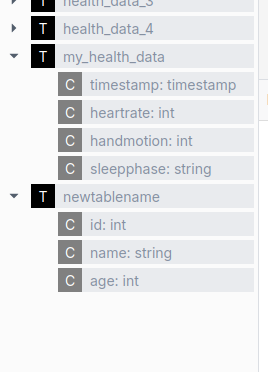 मेटास्टोर का उपयोग करने वाले घटक का एक उदाहरण है इलम टेबल एक्सप्लोरर.
स्पार्क के अनुकूलन तत्वों का उपयोग करें
स्पार्क एसक्यूएल कई अनुकूलन सुविधाएँ प्रदान करता है जो विभाजन के माध्यम से आपके क्वेरी प्रदर्शन में काफी सुधार कर सकते हैं, क्लस्टरिंग, और उपयुक्त भंडारण प्रारूप। ये अनुकूलन तकनीकें स्पार्क प्रक्रिया प्रश्नों को अधिक कुशलता से हल करने में मदद करती हैं, खासकर जब बड़े डेटासेट से निपटते हैं, स्कैन किए जाने वाले डेटा की मात्रा को कम करके और डिस्क पर डेटा संगठन में सुधार करके।
निम्न उदाहरण एक तालिका परिभाषा दिखाता है जिसमें कई ऑप्टिमाइज़ेशन तकनीकें शामिल हैं:
- तालिका को विभाजित करना
खजूरऔरभूक्षेत्रकॉलम, जो स्पार्क को अप्रासंगिक विभाजन को छोड़ने की अनुमति देता है - द्वारा डेटा क्लस्टरिंग
यूज़रआईडीसंबंधित पंक्तियों के लिए डेटा स्थानीयता को बेहतर बनाने के लिए - डेटा को इसके अनुसार क्रमबद्ध करना
व्यूटाइमअधिक कुशल रेंज प्रश्नों के लिए - बेहतर वितरण के लिए डेटा को बकेट में व्यवस्थित करना
- का उपयोग करना
लकड़ीप्रारूप जो स्तंभ भंडारण और कुशल क्वेरी के लिए अनुकूलित है
बनाना सारणी page_view
(
व्यूटाइम आईएनटी,
यूज़रआईडी बिगिंट,
page_url स्ट्रिंग,
referrer_url स्ट्रिंग,
मित्र सरणी<बिगिंट>,
गुण मानचित्र<तार, तार>,
डीटी स्ट्रिंग,
देश स्ट्रिंग
) सम्मति देना "यह पेज व्यू टेबल है"
विभाजित द्वारा(डीटी, भूक्षेत्र)
संकुल द्वारा(यूज़रआईडी) हल द्वारा(व्यूटाइम) में 32 बाल्टी
संग्रहीत जैसा लकड़ी
वैकल्पिक तालिका प्रारूपों द्वारा प्रदान की गई सुविधाओं का उपयोग करके एक समान प्रभाव प्राप्त किया जा सकता है, जो हैं चर्चा नीचे
अपनी क्वेरीज़ का प्रदर्शन बढ़ाने के लिए Spark SQL एक्सटेंशन का उपयोग करें
स्पार्क एसक्यूएल आपको अंतर्निहित एसक्यूएल कार्यक्षमता में सुधार के लिए विभिन्न एसक्यूएल एक्सटेंशन का उपयोग करने की अनुमति देता है।
यह के माध्यम से किया जाता है spark.sql.एक्सटेंशन जायदाद।
उदाहरण के लिए, आप डेल्टा झील एक्सटेंशन, जो डेल्टा तालिकाओं के साथ काम करने के लिए अतिरिक्त सुविधाएँ प्रदान करता है।
हालाँकि, इस गुण का उपयोग अन्य एक्सटेंशन को सक्षम करने के लिए भी किया जा सकता है, जैसे स्पार्क निष्पादन इंजन के लिए SQL ऑप्टिमाइज़ेशन एक्सटेंशन। इसे सक्षम करने के लिए, या तो:
- नई Ilum Spark छवियों में से एक का उपयोग करें
- मेवेन रिपॉजिटरी से एक्सटेंशन की जेएआर फ़ाइल जोड़ें:
org.apache.kyuubi:kyuubi-extension-spark-<SPARK_VERSION>_<SCALA_VERSION>:<KYUUBI_VERSION> - अपने स्पार्क की कंटेनर छवि को संशोधित करें और क्लासपाथ में जेएआर फ़ाइल जोड़ें
यह आपको अपने SQL इंजन में एक्सटेंशन को निम्नानुसार जोड़ने की अनुमति देगा: spark.sql.extensions=org.apache.kyuubi.sql.KyuubiSparkSQLExtension.
यह प्रॉपर्टी अल्पविराम से अलग किए गए एक्सटेंशन की सूची है, जिससे आप कई एक्सटेंशन जोड़ सकते हैं.
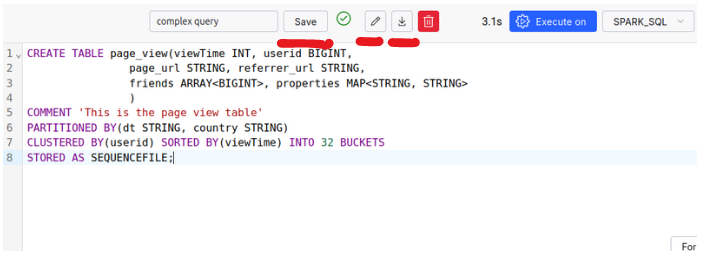
क्वेरीज़ सहेजें, SQL क्वेरीज़ आयात और निर्यात करें
The SQL Editor allows you to save your queries for later use, as well as import and export them.
Make use of More Advanced Data Formats: Apache Iceberg, Apache Hudi, and Delta Tables
डेल्टा टेबल्स
डेल्टा झील एक ओपन-सोर्स स्टोरेज लेयर है जो एसीआईडी लेनदेन को अपाचे स्पार्क में लाती है और बड़ा डेटा वर्कलोड। यह उपयोग करता है डेल्टा टेबल्स इसके मुख्य प्रारूप के रूप में, संयोजन लकड़ी की छत फ़ाइलें के साथ हस्तांतरण लॉग. ये लॉग तालिका संस्करणों का ट्रैक रखते हैं, DML कार्रवाइयों को कैप्चर करते हैं, और ताले के साथ संगामिति को संभालें।
सरल शब्दों में, विभाजन पर प्रत्येक ऑपरेशन एक नया संस्करण बनाता है, जो पिछले एक को संरक्षित करता है यदि आवश्यक हो तो आसान रोलबैक। एक हस्तांतरण लॉग फ़ाइल इन संस्करणों को लॉकिंग और संस्करण का प्रबंधन करने में मदद करती है नियंत्रण, डेटा स्थिरता सुनिश्चित करना।
डेल्टा झील का उपयोग करना आसान है और अतिरिक्त सुविधाओं को जोड़ने के लिए एकीकृत करने के लिए एक उत्कृष्ट विकल्प है अपने इलम पर्यावरण के लिए।
For more details on Delta Lake’s concurrency management with ओसीसी (आशावादी संगामिति नियंत्रण), और यह स्ट्रीमिंग और बैच को कैसे एकीकृत करता है, हम यात्रा करने की सलाह देते हैं डेल्टा झील प्रलेखन.
सुविधाऐं:
- एसीआईडी गुण रखरखाव
- अद्यतन, हटाएँ, और मर्ज संचालन के लिए समर्थन
- स्कीमा विकास: तालिकाओं को बदलना
- संस्करण: करने की क्षमता समय यात्रा डेटासेट के पिछले संस्करणों के लिए
- पारंपरिक प्रारूपों की तुलना में बेहतर अनुकूलन
- स्ट्रीमिंग और बैच दोनों के लिए इन सुविधाओं का एकीकरण
डेल्टा टेबल्स का उपयोग कैसे करें?
By default, Delta Tables are enabled inside Ilum’s SQL Editor. The following configurations are set for you:
spark.sql.एक्सटेंशन=io.delta.sql.DeltaSparkSessionExtension
spark.sql.कैटलॉग.स्पार्क_कैटलॉग=org.apache.spark.sql.delta.catalog.DeltaCatalog
स्पार्क.डेटाब्रिक्स.डेल्टा.कैटलॉग.अपडेट.सक्षम=सच्चा
Therefore, you can make use of Delta Tables inside your SQL Editor without any extra steps.
-
डेल्टा तालिका बनाना
बनाना सारणी my_health_data_delta
(
    टाइमस्टैम्प  टाइमस्टैम्प,
    हृदय गति  आईएनटी,
    हैंडमोशन आईएनटी,
    स्लीपफ़ेज़ वरचर(20)
) का उपयोग करके डेल्टा; -
कुछ DML ऑपरेशन चलाएँ
अंतःस्थापित करना में my_health_data_delta (टाइमस्टैम्प, हृदय गति, हैंडमोशन, स्लीपफ़ेज़) मान
(फेंकना('2024-10-01 00:00:00' जैसा टाइमस्टैम्प), 70, 1, 'जागो'),
(फेंकना('2024-10-01 01:00:00' जैसा टाइमस्टैम्प), 68, 0, 'प्रकाश'),
(फेंकना('2024-10-01 02:00:00' जैसा टाइमस्टैम्प), 65, 0, 'गहरा'),
(फेंकना('2024-10-01 03:00:00' जैसा टाइमस्टैम्प), 64, 1, 'गहरा'),
(फेंकना('2024-10-01 04:00:00' जैसा टाइमस्टैम्प), 66, 0, 'प्रकाश');मिटाना से my_health_data_delta
कहां टाइमस्टैम्प = '2024-10-01 02:00:00';आधुनिकीकरणअ my_health_data_delta
अस्त हो हृदय गति = 50
कहां टाइमस्टैम्प = '2024-10-01 03:00:00'; -
संस्करण इतिहास और विवरण देखें
वर्णन करना इतिहास my_health_data_delta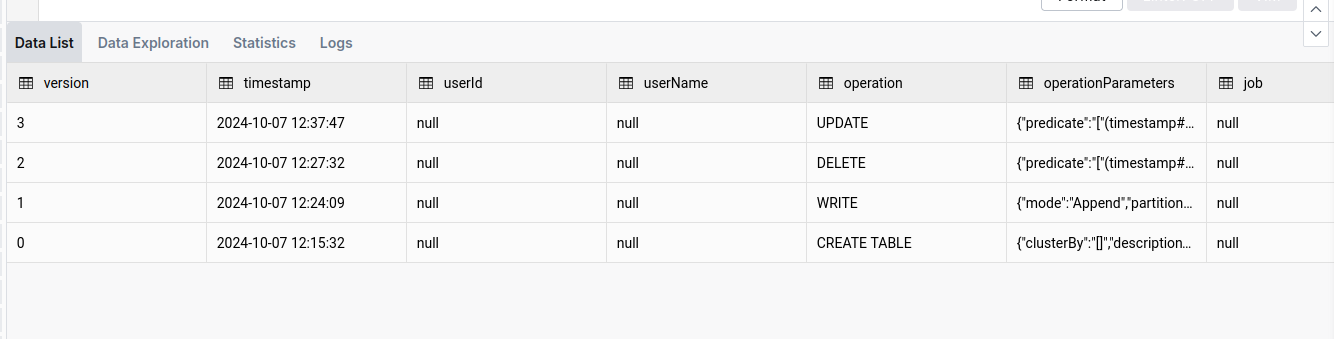
-
समय और संस्करण यात्रा कार्यक्षमता का उपयोग करें
चुनना *
से my_health_data_delta संस्करण जैसा का 1
या किसी विशिष्ट तिथि की यात्रा करने के लिए (जैसे, एक दिन पहले):
चुनना *
से my_health_data_delta टाइमस्टैम्प जैसा का date_sub(current_date(), 1) -
सफाई गर्दै
जबकि डेल्टा टेबल्स प्रदर्शन के लिए अनुकूलित हैं, वे जमा हो सकते हैं समय के साथ बड़ी संख्या में फाइलें। वही
निर्वातऑपरेशन इन फ़ाइलों को साफ करने और तालिका को अनुकूलित करने में मदद करता है। आप इसके बारे में पढ़ सकते हैं यहाँ.वैक्यूम my_health_data_deltaया यह देखने के लिए कि कौन सी फ़ाइलें हटा दी जाएंगी (1000 तक):
वैक्यूम my_health_data_delta ड्राई रन
अपाचे हुदी
जबकि अपाचे हुडी डेल्टा झील के समान है, इसके अपने अद्वितीय फायदे हैं। अपाचे हुदी में, प्रत्येक विभाजन को व्यवस्थित किया जाता है फ़ाइल समूह. प्रत्येक फ़ाइल समूह में निम्न शामिल हैं स्लाइस, जिसमें डेटा फ़ाइलें और लॉग फ़ाइलें होती हैं. लॉग फ़ाइलें क्रियाओं और प्रभावित डेटा को रिकॉर्ड करती हैं, जिससे हुडी को पढ़ने के संचालन को अनुकूलित करने की अनुमति मिलती है डेटा का नवीनतम दृश्य उत्पन्न करने के लिए बेस फ़ाइल पर इन क्रियाओं को लागू करना।
प्रक्रिया को सुव्यवस्थित करने के लिए, कॉन्फ़िगर करना संपीड़न संचालन आवश्यक है। संघनन एक अद्यतन आधार फ़ाइल के साथ एक नया टुकड़ा बनाता है, प्रदर्शन में सुधार।
This structure, along with Hudi’s extensive optimization, enhances write efficiency, making it faster than alternative formats in certain scenarios. Furthermore, Hudi supports एनबीसीसी (गैर-अवरोधन संगामिति नियंत्रण) इसके बजाय ओसीसी (आशावादी संगामिति नियंत्रण), जो वातावरण में अधिक प्रभावी है उच्च समवर्ती लिखता है।
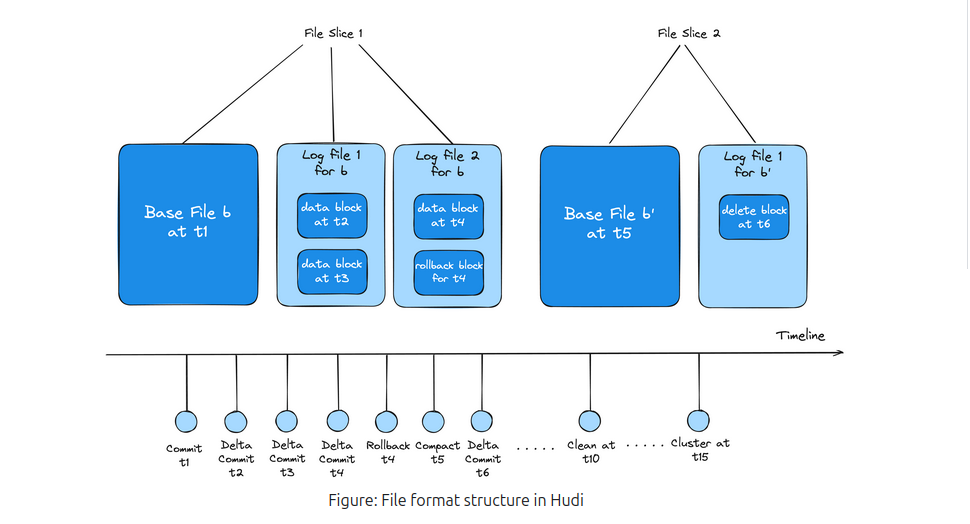
संक्षेप में, अपाचे हुडी भारी समवर्ती लेखन संचालन के साथ वातावरण के लिए अच्छी तरह से अनुकूल है और कस्टम अनुकूलन पर अधिक नियंत्रण प्रदान करता है, हालांकि यह डेल्टा झील की तुलना में कम उपयोगकर्ता के अनुकूल हो सकता है।
इसके बारे में अधिक जानने के लिए, आपको यात्रा करनी चाहिए अपाचे हुदी प्रलेखन पृष्ठ
अपाचे हुडी का उपयोग कैसे करें?
डेल्टा झील के विपरीत, अपाचे हुदी पूर्व-कॉन्फ़िगर नहीं है; इसलिए, आपको क्लस्टर कॉन्फ़िगरेशन परिवर्तित करने और निम्न गुण जोड़ने की आवश्यकता होगी:
{
  "स्पार्क.जार्स.पैकेज": "org.apache.hudi:hudi-spark3.5-bundle_2.12:0.15.0",
  "स्पार्क.सीरियलाइज़र": "org.apache.spark.serializer.KryoSerializer",
  "spark.sql.catalog.spark_catalog": "org.apache.spark.sql.hudi.catalog.HoodieCatalog",
  "spark.sql.एक्सटेंशन": "org.apache.spark.sql.hudi.HoodieSparkSessionExtension",
  "स्पार्क.kryo.registrator": "org.apache.spark.HoodieSparkKryoRegistrar"
}
Remember to make sure that the version of the Hudi-spark’s jar is matching the version of the Spark you are using.
इसके अतिरिक्त, चूंकि जार पैकेज प्रीइंस्टॉल्ड नहीं है, इंजन आरंभीकरण के दौरान आपको JVM हीप आउट ऑफ मेमोरी की समस्या का सामना करना पड़ सकता है। इस समस्या के बारे में अधिक पढ़ने और इसे ठीक करने के तरीके के लिए, कृपया देखें समस्या निवारण अनुभाग.
-
एक हुडी टेबल बनाएं
बनाना सारणी my_sales_data_hudi (
sale_id स्ट्रिंग,
sale_date टाइमस्टैम्प,
product_id स्ट्रिंग,
बड़ तादाद आईएनटी,
दाम दशमलव भिन्न(10, 2)
) का उपयोग करके हुडी
टीबीएलगुण (
प्रकार = 'मोर',
प्राथमिक कुंजी = 'sale_id'
);सूचना दें
प्रकार = 'मोर'संपत्ति, जो के लिए खड़ा है पढ़ने पर मर्ज करें. यह गुण तालिका के प्रकार को बदलता है, जो पढ़ने और लिखने के बीच अनुकूलन को संतुलित करता है कार्रवाई। -
DML ऑपरेशन करें
अंतःस्थापित करना में my_sales_data_hudi (sale_id, sale_date, product_id, बड़ तादाद, दाम) मान
('एस001', फेंकना('2024-10-01 10:00:00' जैसा टाइमस्टैम्प), 'पी001', 10, 99.99),
('एस002', फेंकना('2024-10-01 11:00:00' जैसा टाइमस्टैम्प), 'पी002', 5, 49.99),
('एस003', फेंकना('2024-10-01 12:00:00' जैसा टाइमस्टैम्प), 'पी003', 20, 19.99),
('एस004', फेंकना('2024-10-01 13:00:00' जैसा टाइमस्टैम्प), 'पी004', 15, 29.99),
('एस005', फेंकना('2024-10-01 14:00:00' जैसा टाइमस्टैम्प), 'पी005', 8, 39.99);आधुनिकीकरणअ my_sales_data_hudi
अस्त हो दाम = 89.99
कहां sale_id = 'एस001';मिटाना से my_sales_data_hudi
कहां sale_id = 'एस003'; -
कमिट की सूची बनाएं
पुकार show_commits (सारणी => 'my_sales_data_hudi', सीमा लगाना => 5)
यहाँ ध्यान दें
commit_timeकॉलम, जो कमिट का समय दिखाता है। हम समय यात्रा करने के लिए इस मूल्य का उपयोग कर सकते हैं। -
समय यात्रा कार्यक्षमता का उपयोग करें
पुकार rollback_to_instant(सारणी => 'my_sales_data_hudi', instant_time => '<commit-time-from-last-step>');यह आदेश तालिका को उस स्थिति में वापस कर देगा जिसमें वह निर्दिष्ट कमिट समय पर थी। ध्यान रखें कि आप केवल नवीनतम प्रतिबद्धता को उलट सकते हैं, इसलिए यदि आप आगे वापस जाना चाहते हैं, आपको कई रोलबैक करने की आवश्यकता है।
अपाचे आइसबर्ग
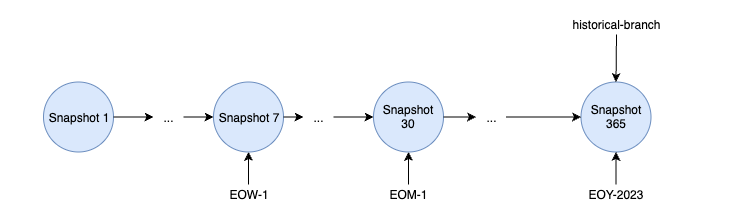
अपाचे आइसबर्ग एक उच्च-प्रदर्शन तालिका प्रारूप है जिसे विशेष रूप से डेटा झीलों के लिए डिज़ाइन किया गया है, अन्य प्रारूपों की तुलना में अद्वितीय क्षमताओं की पेशकश। एक अलग वास्तुकला के आसपास निर्मित, आइसबर्ग उपयोग करता है स्नैपशॉट तालिका राज्यों को प्रबंधित करने के लिए, पारंपरिक लेनदेन लॉग पर निर्भरता से बचना। यह स्नैपशॉट-आधारित डिज़ाइन समय में विशिष्ट बिंदुओं पर एक तालिका की पूरी स्थिति को कैप्चर करता है।
प्रत्येक स्नैपशॉट में एक सूची मैनिफ़ेस्ट करें, जो बदले में कई मैनिफेस्ट का संदर्भ देता है। ये मैनिफ़ेस्ट विशिष्ट डेटा फ़ाइलों के लिए पॉइंटर्स व्यवस्थित करते हैं और प्रासंगिक मेटाडेटा रखते हैं, स्नैपशॉट में डेटा फ़ाइलों को डुप्लिकेट किए बिना परिवर्तनों को कुशलतापूर्वक ट्रैक करने के लिए आइसबर्ग को सक्षम करना। यह दृष्टिकोण भंडारण का अनुकूलन करता है, क्योंकि स्नैपशॉट मौजूदा डेटा फ़ाइलों का पुन: उपयोग कर सकते हैं, अतिरेक को कम कर सकते हैं।
आइसबर्ग भी शक्तिशाली सुविधाएँ प्रदान करता है जैसे ब्रांचिंग और टैगिंग, उपयोगकर्ताओं को तालिकाओं की शाखाएं बनाने और स्नैपशॉट को मानव-पठनीय टैग असाइन करने की अनुमति देता है। संस्करण नियंत्रण के लिए ये सुविधाएँ आवश्यक हैं, टीमों को समवर्ती अद्यतनों को प्रबंधित करने और उत्पादन के लिए प्रतिबद्ध करने से पहले परिवर्तनों का परीक्षण करने में सक्षम बनाना।
लचीले डेटा संगठन विकल्पों और मजबूत संस्करण क्षमताओं के साथ, अपाचे आइसबर्ग आधुनिक डेटा झीलों के लिए स्केलेबल, प्रदर्शनकारी डेटा प्रबंधन को सक्षम बनाता है।
अपाचे आइसबर्ग दस्तावेज़ीकरण पर अधिक
अपाचे आइसबर्ग का उपयोग कैसे करें?
डेल्टा झील के विपरीत, अपाचे हुदी पूर्व-कॉन्फ़िगर नहीं है; इसलिए, आपको क्लस्टर कॉन्फ़िगरेशन परिवर्तित करने और निम्न गुण जोड़ने की आवश्यकता होगी:
{
  "स्पार्क.जार्स.पैकेज": "org.apache.iceberg: आइसबर्ग-स्पार्क-रनटाइम-3.5_2.12: 1.6.1",
  "spark.sql.एक्सटेंशन": "org.apache.iceberg.spark.extensions.IcebergSparkSessionExtensions",
  "spark.sql.catalog.spark_catalog": "org.apache.iceberg.spark.SparkSessionCatalog",
  "spark.sql.catalog.spark_catalog.type": "हाइव",
  "spark.sql.catalog.spark_catalog.uri": "thrift://ilum-hive-metastore:9083"
}
Remember to make sure that the version of the Iceberg’s jar is matching the version of the Spark you are using and that the Hive Metastore is available at the specified URI.
इसके अतिरिक्त, चूंकि जार पैकेज प्रीइंस्टॉल्ड नहीं है, इंजन आरंभीकरण के दौरान आपको JVM हीप आउट ऑफ मेमोरी की समस्या का सामना करना पड़ सकता है। इस समस्या के बारे में अधिक पढ़ने और इसे ठीक करने के तरीके के लिए, कृपया देखें समस्या निवारण अनुभाग.
-
एक हिमशैल तालिका बनाएँ:
बनाना सारणी weather_stations
(
station_id स्ट्रिंग,
reading_time टाइमस्टैम्प,
तापमान दशमलव भिन्न(4,1),
नमी आईएनटी,
wind_speed दशमलव भिन्न(4,1)
) का उपयोग करके हिमशैल -
तालिका में डेटा सम्मिलित करना
अंतःस्थापित करना में weather_stations मान
('डब्ल्यूएस001', फेंकना('2024-03-01 08:00:00' जैसा टाइमस्टैम्प), 15.5, 65, 12.3),
('डब्ल्यूएस001', फेंकना('2024-03-01 09:00:00' जैसा टाइमस्टैम्प), 17.2, 62, 10.5),
('डब्ल्यूएस001', फेंकना('2024-03-01 10:00:00' जैसा टाइमस्टैम्प), 19.8, 58, 11.7),
('डब्ल्यूएस002', फेंकना('2024-03-01 08:00:00' जैसा टाइमस्टैम्प), 14.2, 70, 8.9),
('डब्ल्यूएस002', फेंकना('2024-03-01 09:00:00' जैसा टाइमस्टैम्प), 16.0, 68, 9.2),
('डब्ल्यूएस002', फेंकना('2024-03-01 10:00:00' जैसा टाइमस्टैम्प), 18.5, 63, 10.1),
('डब्ल्यूएस003', फेंकना('2024-03-01 08:00:00' जैसा टाइमस्टैम्प), 13.7, 72, 15.4),
('डब्ल्यूएस003', फेंकना('2024-03-01 09:00:00' जैसा टाइमस्टैम्प), 15.9, 69, 14.8),
('डब्ल्यूएस003', फेंकना('2024-03-01 10:00:00' जैसा टाइमस्टैम्प), 18.1, 65, 13.2); -
वर्तमान स्नैपशॉट से एक टैग बनाएं
परिवर्तित होना सारणी weather_stations बनाना टैग `initial_state` -
डेटा में कुछ संशोधन करें
आधुनिकीकरणअ weather_stations
अस्त हो
  तापमान = 16.5
कहां
  station_id = 'डब्ल्यूएस001'
  और reading_time = फेंकना('2024-03-01 08:00:00' जैसा टाइमस्टैम्प)
मिटाना से weather_stations कहां station_id = 'डब्ल्यूएस002' -
सभी स्नैपशॉट सूचीबद्ध करें
चुनना * से spark_catalog.चूक.weather_stations.स्नैपशॉट
टाइमस्टैम्प सहेजें (
commited_at) स्नैपशॉट का जिसे आप बाद के लिए समय यात्रा करना चाहते हैं। -
इतिहास प्राप्त करें
चुनना * से spark_catalog.चूक.weather_stations.इतिहास -
किसी विशिष्ट टैग पर वापस जाना
पुकार spark_catalog.प्रणाली.set_current_snapshot (
  सारणी => 'spark_catalog.default.weather_stations',
  संदर्भ => 'initial_state'
) -
किसी विशिष्ट स्नैपशॉट के लिए समय यात्रा
चुनना * से weather_stations टाइमस्टैम्प जैसा का <टाइमस्टैम्प-से-कहीं जाना-5>
How to use UDFs in the SQL Editor?
UDFs (User Defined Functions) are a powerful feature in SQL that allows you to define custom functions to use in your queries. They are also supported in the SQL Editor, allowing you to extend the functionality of your queries.
-
अपने यूडीएफ के लिए एक कक्षा बनाएं
पैकेज example

आयात org.apache.hadoop.छत्ता.ql.exec.UDF

कक्षा स्कालायूडीएफ extends UDF {
  डीईएफ़ evaluate(str: String): Int = {
    str.length()
  }
}
की आवश्यक निर्भरता को शामिल करना सुनिश्चित करें
हाइव-निष्पादन: 3.1.3आपकी परियोजना में:<निर्भरता>
<समूह आईडी>org.apache.hive</समूह आईडी>
<आर्टिफैक्टआईडी>हाइव-निष्पादन</आर्टिफैक्टआईडी>
<विवरण>3.1.3</विवरण>
</निर्भरता> -
एक जार पैकेज बनाएं और इसे अपने वितरित भंडारण में डालें

अपनी जार फ़ाइल का पथ याद रखना सुनिश्चित करें।
-
Add it to the SQL Editor spark session
आगे कहना खटकना '<the-path-to-your-jar-file>' -
एक फ़ंक्शन बनाएं, जो आपके द्वारा परिभाषित udf से जुड़ा हुआ है
बनाना
नहीं तो बदलें फलन स्कालायूडीएफ जैसा 'उदाहरण। स्कालायूडीएफ' -
क्वेरी में इसका उपयोग करना
चुनना नाम, स्कालायूडीएफ(नाम)
से newtableनाम
समस्या निवारण
It is useful to know that when executing SQL queries from the SQL Editor page, the SQL execution engines are visible as normal Ilum Jobs. This means that you can monitor their state, check logs and statistics, just like any other job in the "Jobs" tab.
स्पार्क-सबमिट के दौरान जेवीएम हीप आउट ऑफ मेमोरी
If in engine’s launch logs, you find an error like this:
थ्रेड "main" io.fabric8.kubernetes.client.KubernetesClientException में अपवाद: Java heap space
    io.fabric8.kubernetes.client.dsl.internal.OperationSupport.waitForResult पर (OperationSupport.java:520)
    io.fabric8.kubernetes.client.dsl.internal पर। ऑपरेशनसपोर्ट.हैंडल रिस्पांस(OperationSupport.java:535)
    ...
    org.apache.spark.deploy.SparkSubmit$.main (SparkSubmit.scala:1129) पर
    org.apache.spark.deploy.SparkSubmit.main(SparkSubmit.scala) पर
के कारण: java.lang.OutOfMemoryError: जावा हीप स्पेस
    ...
It is likely caused by the default JVM heap size of Ilum’s internal spark-submit being too small for your task.
इसे ठीक करने के लिए, आप बाहरी स्पार्क सबमिट. This way, the spark submit process will not be constrained to Ilum’s pod resources.