अपाचे स्पार्क कनेक्ट ऑन इलम : कॉन्फ़िगरेशन और कनेक्शन गाइड
स्पार्क कनेक्ट क्या है?
स्पार्क कनेक्ट के लिए एक आधुनिक क्लाइंट-सर्वर इंटरफ़ेस है अपाचे स्पार्क that enables remote execution of Spark workloads from lightweight clients such as Python, Java, Scala, R, and SQL-based tools. Introduced in Spark 3.4, Spark Connect decouples the Spark client from the Spark runtime, allowing developers to इंटरैक्टिव डेटा एप्लिकेशन बनाएं, नोटबुक, और डैशबोर्ड स्थानीय रूप से पूर्ण स्पार्क इंजन को तैनात किए बिना।
Spark Connect लीवरेज करता है जीआरपीसी-आधारित संचार रिमोट स्पार्क सर्वर के साथ इंटरैक्ट करने के लिए, डेटा इंजीनियरिंग, डेटा साइंस और एनालिटिक्स वर्कफ़्लोज़ के लिए लचीलापन, बेहतर सुरक्षा और सरलीकृत बुनियादी ढाँचा प्रदान करता है।
यह है very similar to Ilum’s approach to Spark microservices, जहां स्पार्क घटकों को कंटेनरीकृत किया जाता है और गतिशील सेवाओं के रूप में उजागर किया जाता है। में प्रयुक्त डिजाइन कुबेरनेट्स पर PySpark माइक्रोसर्विस तैनात करना : दोनों स्केलेबल, स्टेटलेस और क्लाइंट साइड पर पूर्ण क्लस्टर सेटअप के बिना स्पार्क तक सुरक्षित पहुंच को सक्षम करते हैं।
Why use Spark Connect on Kubernetes?
Traditional Spark submission often requires complex local setups (Java, Hadoop binaries, exact Spark versions). Spark Connect eliminates this "dependency hell."
| लक्षण | Traditional Spark Submission (स्पार्क-सबमिट) | स्पार्क कनेक्ट |
|---|---|---|
| स्थापत्यशैली | Monolithic (Driver runs on client or cluster edge) | Decoupled (Client is separate from Server) |
| Client Requirements | Heavy (Requires Java, Spark binaries, Hadoop configs) | Lightweight (Only Python/Go/Scala library required) |
| Network Protocol | Custom RPC (Sensitive to version mismatch) | gRPC (Standard, version-agnostic, firewall-friendly) |
| Iteration Speed | Slow (Build & Deploy jars) | Fast (Interactive, REPL-style development) |
| भाषा समर्थन | limited to JVM/Python | Polyglot (Python, Scala, Go, Rust, etc.) |
For a deeper dive into how Ilum leverages this for multi-tenancy, see our Architecture Documentation.
इलम में, स्पार्क कनेक्ट स्वाभाविक रूप से हमारे माइक्रोसर्विस-आधारित स्पार्क आर्किटेक्चर के साथ संरेखित होता है। आप एक स्पार्क कनेक्ट सर्वर को एक मानक नौकरी के रूप में तैनात कर सकते हैं और पॉड नाम, पॉड आईपी, या कुबेरनेट्स के माध्यम से उजागर सेवा का उपयोग करके विभिन्न कनेक्शन विधियों के माध्यम से इसे एक्सेस कर सकते हैं।
Prepare Your Client Environment
Before connecting, you need a lightweight client library. Unlike traditional Spark, you do not need a local JVM or Hadoop installation.
Python (PySpark)
- Spark 4 (default)
- Spark 3
pip install पिस्पार्क[connect]==4.0.1 grpcio-status
pip install पिस्पार्क[connect]==3.5.8 grpcio-status
Scala (sbt)
For Scala applications, add the Spark Connect client dependency:
- Spark 4 (default)
- Spark 3
libraryDependencies += "org.apache.spark" %% "spark-connect-client-jvm" % "4.0.1"
libraryDependencies += "org.apache.spark" %% "spark-connect-client-jvm" % "3.5.8"
Spark SQL CLI
You can also use the generic Spark SQL CLI to connect remotely:
/path/to/spark/bin/spark-sql --remote "sc://<ilum-cluster-address>:15002"
नोट: Always match your client library version (e.g.,
4.0.1; fallback3.5.8) with the Spark version running on your Ilum cluster.
Ilum UI के माध्यम से Apache Spark Connect Instance बनाना
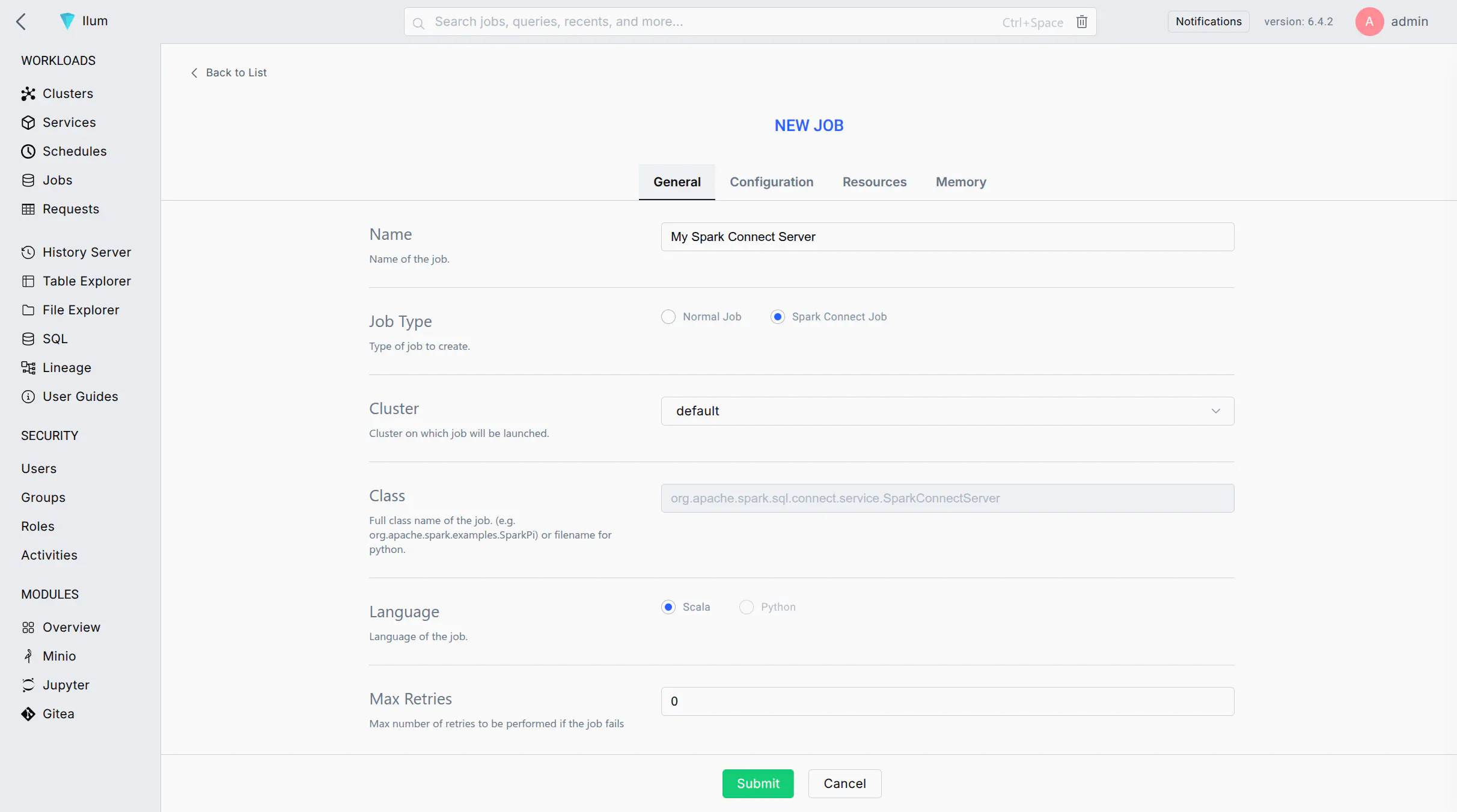
वेब यूआई का उपयोग करके अपने इलम क्लस्टर पर नौकरी के रूप में स्पार्क कनेक्ट सर्वर लॉन्च करने के लिए इन चरणों का पालन करें:
-
Start a New Spark Job: Log in to the Ilum UI and navigate to the Jobs section. Click on नई नौकरी एक नया स्पार्क जॉब बनाने के लिए।
-
Job Name: Enter a recognizable name for the job (e.g.,
स्पार्क कनेक्ट सर्वर) इसे बाद में UI में पहचानने के लिए। -
Main Class: Set the job's main class to:
org.apache.spark.sql.connect.service.SparkConnectServerThis is the built-in Spark class that starts the Spark Connect server process, enabling remote connectivity to Spark clusters.
-
Spark Configuration: Go to the Configuration tab/section for the job. Add the following Spark property to ensure the Spark Connect server code is available:
- Spark 4 (default)
- Spark 3
Key: स्पार्क.जार्स.पैकेज
मूल्य: org.apache.spark:spark-connect_2.13:4.0.1
Key: स्पार्क.जार्स.पैकेज
मूल्य: org.apache.spark:spark-connect_2.12:3.5.8
This configuration instructs Spark to fetch the Spark Connect library from Maven when the job starts.
-
(Optional) Label the Pod: If you plan to expose this Spark Connect server via a Kubernetes Service, add a label to the Spark driver pod:
- Key:
स्पार्क.कुबेरनेट्स.ड्राइवर.लेबल.टाइप - मूल्य:
स्पार्ककनेक्ट
This will tag the Spark Connect server's pod with a label
प्रकार = स्पार्ककनेक्टfor easy service selection. - Key:
-
Submit the Job: Click जमा करें. इलम स्पार्क जॉब को क्लस्टर में तैनात करेगा। थोड़े समय के बाद, आपको नौकरी चल रही नौकरियों की सूची में देखना चाहिए।
-
Verify the Server is Running: Wait for the job status to become "Running". You can check the job's logs for a message indicating Spark Connect has started (e.g., a log line mentioning port 15002). Once running, the Spark Connect server is listening for client connections on the default port 15002.
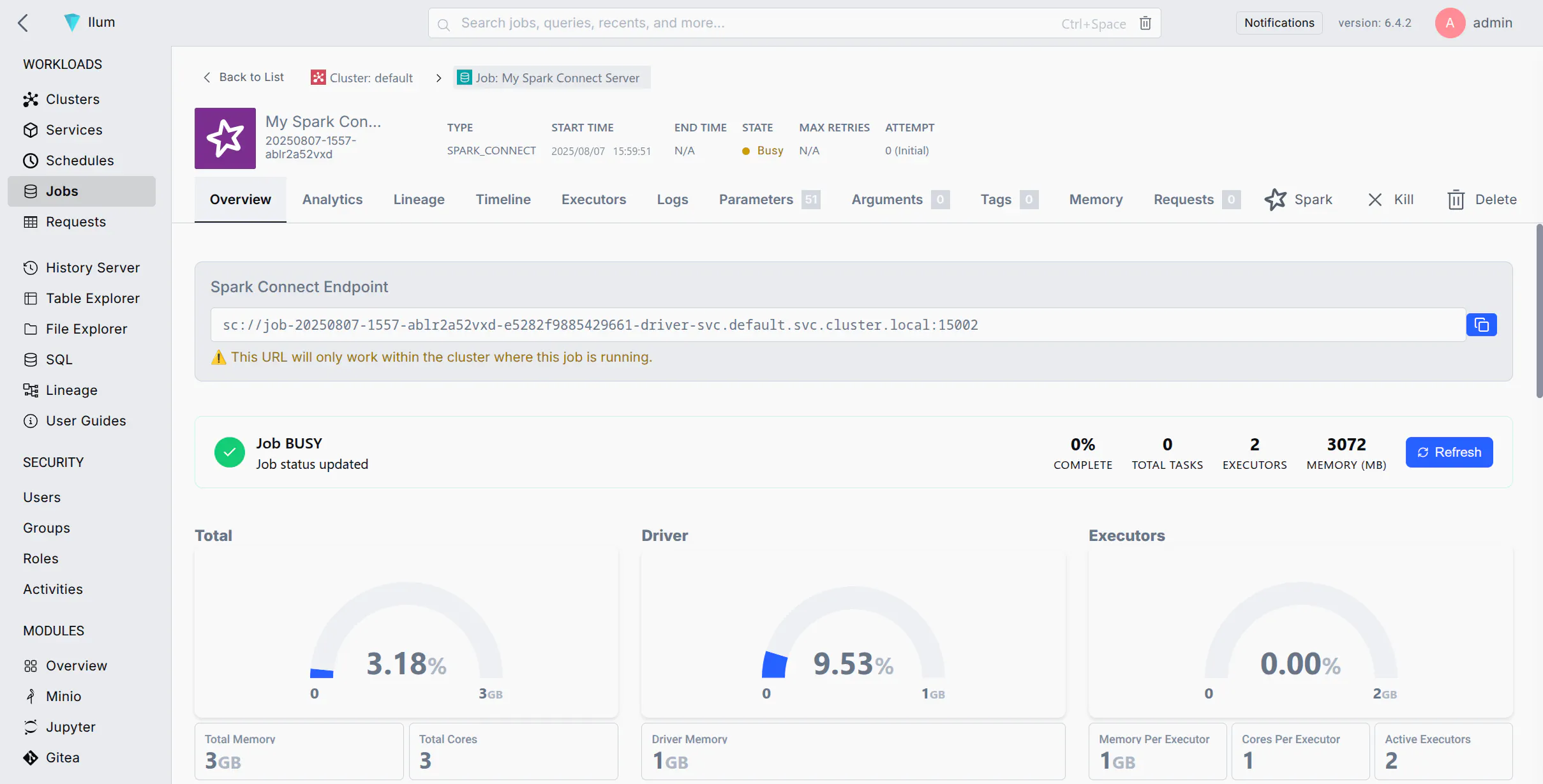
If your job fails immediately, ensure you added स्पार्क.जार्स.पैकेज with the correct version.
स्पार्क कनेक्ट सर्वर से कनेक्ट करना
एक बार स्पार्क कनेक्ट सर्वर चलने के बाद, आप स्पार्क कनेक्ट यूआरएल (अनुसूचित जाति://।।।). आपके नेटवर्क सेटअप के आधार पर नीचे विभिन्न कनेक्शन विधियां दी गई हैं:
- विधि 1: पॉड नाम (क्लस्टर DNS) से कनेक्ट करें
- विधि 2: पॉड आईपी द्वारा कनेक्ट करें
- Method 3: Port Forwarding with kubectl
- विधि 4: स्पार्क कनेक्ट के लिए एक सेवा को उजागर करना
If your environment allows DNS resolution of pod names (for example, your client is within the cluster or can resolve the cluster's internal DNS), you can connect using the pod's DNS name. Kubernetes assigns each pod a DNS name of the form <pod-name>का उपयोग कर सकते हैं <namespace>.pod.cluster.local (कुबेरनेट्स DNS). This DNS name resolves to the pod's IP address inside the cluster.
सीढ़ी:
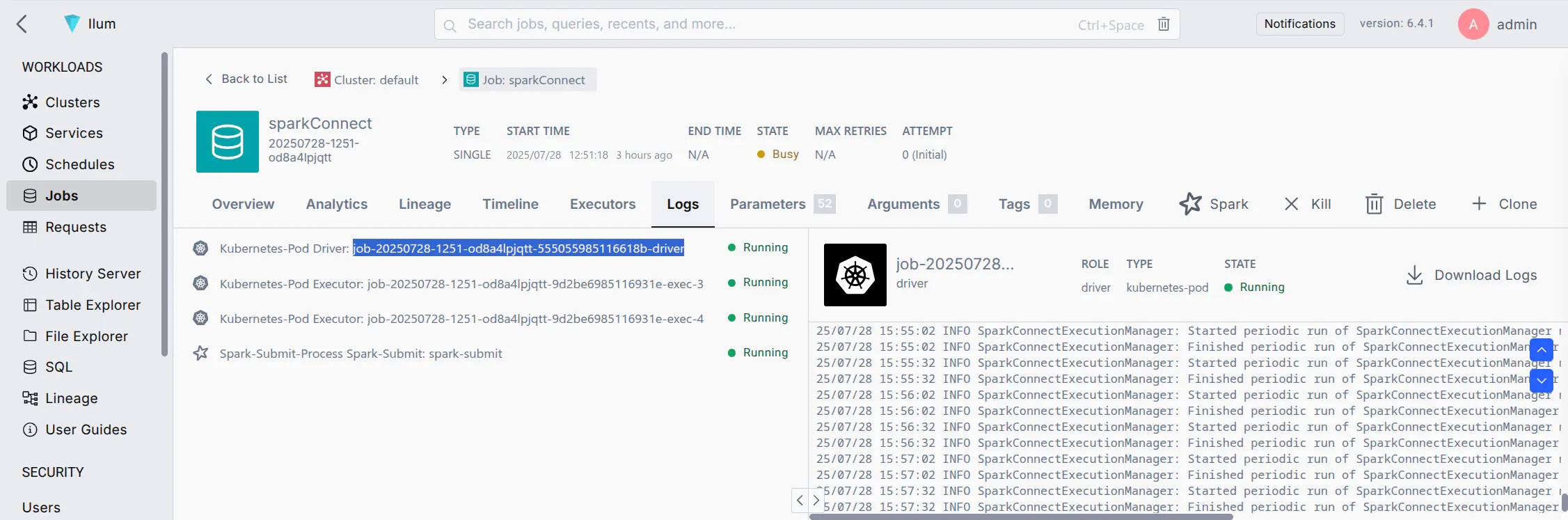
- Find the Pod Name: In the Ilum UI, locate the Spark Connect job you started. Note the driver pod name (Ilum may show it in the job details or logs). It will be something like
नौकरी-xxxxxx-चालक(सटीक प्रारूप भिन्न हो सकता है)। - Construct the URL: Use the pod's fully qualified DNS name. For example, if the pod name is
नौकरी-ABC123-चालकमेंचूकनामस्थान, पता होगा:sc://job-abc123-driver.default.pod.cluster.local:15002 - Connect via Spark Client: Use this URL in your SparkSession builder or Spark shell. For example, in PySpark you can do:
notebook.ipynb
से पिस्पार्क.एसक्यूएल आयात स्पार्कसेशन

उत्तेजक गुण = स्पार्कसेशन.builder.बेमिलनसार(
    "sc://job-abc123-driver.default.pod.cluster.local:15002"
).getOrCreate()
This will create a Spark session that connects remotely to the Spark Connect server at the given DNS address. Ensure that your environment's DNS can resolve .pod.cluster.local पते (आमतौर पर केवल तभी सच होता है जब क्लस्टर के भीतर या वीपीएन के माध्यम से क्लस्टर नेटवर्क पर चल रहा हो)।
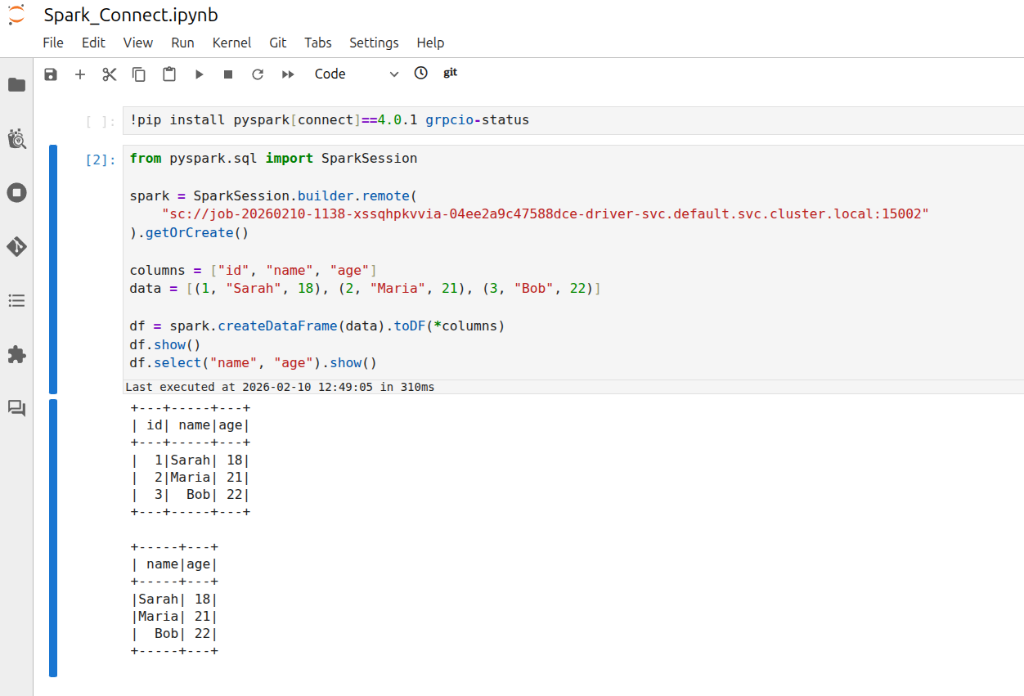
नोट: This is crucial for managing your Apache Spark applications. If your client is running inside the same namespace in the cluster, you might not need the full domain. For instance, just sc://job-abc123-driver:15002 could work due to Kubernetes' DNS search path. However, using the full पॉड.क्लस्टर.लोकल नामस्थान के साथ पता सबसे स्पष्ट और विश्वसनीय दृष्टिकोण है।
If DNS resolution is not available, you can use the pod's IP address directly in the Spark Connect URL. This requires that your client environment can reach the pod IP (e.g., if you are on the same network or have appropriate routing to the cluster's pod network).
सीढ़ी:
- Get the Pod IP: Find the IP address of the Spark Connect pod. In Ilum UI, check the job details for an IP, or use the CLI:
Kubectl GET पॉड <pod-name> -O वाइडto see the pod's IP. - Construct the URL: Use the IP in place of the host. For example, if the pod IP is
10.42.1.25, URL होगा:sc://10.42.1.25:15002 - Connect via Spark Client: Use the IP-based URL in your Spark client. For example:
connect_by_ip.py
उत्तेजक गुण = स्पार्कसेशन.builder.बेमिलनसार("sc://10.42.1.25:15002").getOrCreate()
यह उस आईपी पर पोर्ट 15002 से कनेक्ट करने का प्रयास करेगा।
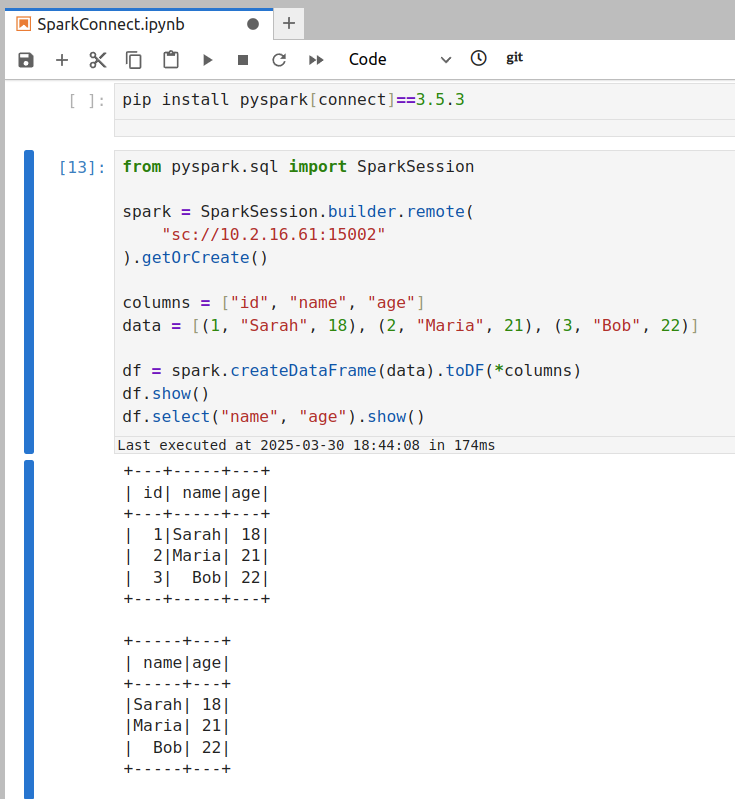
सुनिश्चित करें कि आपकी मशीन वास्तव में स्पार्क सर्वर के उस आईपी पते तक पहुंच सकती है।
- यदि आपका ग्राहक है क्लस्टर के अंदर (या उसी वीपीसी/नेटवर्क में), पॉड आईपी पहुंच योग्य होना चाहिए।
- यदि आपका ग्राहक है क्लस्टर के बाहर (e.g., your local laptop), the pod IP is likely not directly routable. In that case, this method will time out or refuse connection. You'd then need to use Method 3 or 4 instead.
If you are connecting from outside the cluster (for example, from your local development environment) and cannot reach the pod IP or DNS directly, a convenient approach is to use Kubernetes port forwarding. Port forwarding opens a tunnel from your local machine to the remote pod's port.
सीढ़ी:
- Run Port-Forward: Open a terminal on your machine that has access to the Kubernetes cluster (where
कुबेक्टलकॉन्फ़िगर किया गया है)। चलाना:बदलेंPort ForwardKubectl पोर्ट-फॉरवर्ड <pod-name> 15002:15002<pod-name>with the Spark Connect pod's name (e.g.,नौकरी-ABC123-चालक). This command will bind your local port 15002 to the pod's port 15002. You should see output like127.0.0.1:15002 -> 15002 से अग्रेषण. स्पार्क सर्वर से कनेक्शन की आवश्यकता होने पर इस प्रक्रिया को चालू रखें।
-
Connect to Localhost: With the port-forward in place, your local machine is now listening on port 15002. In your Spark client, connect to
लोकलहोस्ट: 15002Spark Connect URL का उपयोग करना:local_script.pyउत्तेजक गुण = स्पार्कसेशन.builder.बेमिलनसार("sc://localhost:15002").getOrCreate()स्पार्क कनेक्ट डिफ़ॉल्ट रूप से पोर्ट 15002 का उपयोग करता है (Quickstart: Spark Connect — PySpark 3.5 documentation), इसलिए यह क्लस्टर को स्पार्क करने के लिए रिमोट कनेक्टिविटी की अनुमति देता है।
sc://localhost:15002सुरंग के माध्यम से क्लस्टर में पहुंच जाएगा। अब आपका स्पार्क सत्र दूरस्थ रूप से क्लस्टर स्पार्क इंस्टेंस से जुड़ा हुआ है। -
Use Spark as Usual: Once connected, you can use the
उत्तेजक गुणsession as if it were local—all DataFrame operations will execute on the cluster.
यह विधि अक्सर विकास के लिए सबसे सरल होती है। जब आप कर लें, तो आप दबाकर पोर्ट-फ़ॉरवर्डिंग को रोक सकते हैं Ctrl+C चल रहे टर्मिनल में Kubectl पोर्ट-फॉरवर्ड आज्ञा।
अधिक स्थायी समाधान के लिए या कई उपयोगकर्ताओं/ग्राहकों को आसानी से कनेक्ट करने की अनुमति देने के लिए, आप कुबेरनेट्स सेवा के माध्यम से स्पार्क कनेक्ट सर्वर को उजागर कर सकते हैं। एक सेवा स्पार्क कनेक्ट पॉड के लिए एक स्थिर नेटवर्क समापन बिंदु (डीएनएस नाम और आईपी) देती है, और वैकल्पिक रूप से इसे क्लस्टर से परे उजागर कर सकती है (उदाहरण के लिए, लोडबैलेंसर या नोडपोर्ट के माध्यम से)।
सेवा के माध्यम से उजागर करने के चरण:
-
Ensure Pod Label: If you haven't already labeled the Spark Connect pod (as suggested in step 5 of the setup above), do so now. You can add a label on the fly with kubectl:
kubectl label pod <pod-name> प्रकार=स्पार्ककनेक्ट(यदि पॉड को पहले से ही स्पार्क कॉन्फ़िगरेशन के माध्यम से लेबल किया गया था, तो इस चरण की आवश्यकता नहीं है।
-
Create a Service: Define a Kubernetes Service YAML that targets this pod by its label.
spark-connect-service.yamlapiVersion: वी 1
प्रकार: सेवा
मेटाडेटा:
नाम: उत्तेजक गुण-connect-सेवा
Namespace: इलम # use the namespace where your Spark Connect pod is running
कल्पना:
चयनकर्ता:
प्रकार: स्पार्ककनेक्ट # this label should match the pod's label
पोर्ट:
- नाम: स्पार्ककनेक्ट
प्रोटोकॉल: टीसीपी
बंदरगाह: 15002 # service port (clients will use this)
टार्गेटपोर्ट: 15002 # target port on the pod
नोडपोर्ट: 30002 # node port (external users will use this nodeip:30002)
प्रकार: नोडपोर्ट # ClusterIP is only accessible within the cluster
# बाहरी पहुंच के लिए, आप यहां प्रकार: नोडपोर्ट या लोडबैलेंसर का उपयोग कर सकते हैं।kubectl apply -स्त्री-विषयक spark-connect-service.yamlयह सेवा किसी भी पॉड के साथ यातायात को रूट करेगी
प्रकार: स्पार्ककनेक्टlabel on port 15002. You can verify withKubectl Get SVC Spark-connect-service.
-
Inside Cluster or VPN: Use the service's DNS name or cluster IP. For example, within the cluster (or on a VPN that can resolve cluster DNS), the URL would be:
sc://spark-connect-service.default.svc.cluster.local:15002नहीं तोsc://spark-connect-service:15002इस पते पर आने वाले सभी ट्रैफ़िक को स्पार्क कनेक्ट पॉड पर भेज दिया जाएगा। -
Outside Cluster (if exposed): If you set the Service type to NodePort or LoadBalancer, use the external address. For NodePort, that might be
sc://<node-ip>:30002. LoadBalancer के लिए, यह हो सकता हैsc://<load-balancer-host>:15002यह इस बात पर निर्भर करता है कि आपका क्लाउड प्रदाता इसे कैसे असाइन करता है। (ये उन्नत परिदृश्य हैं; अक्सर पोर्ट-फ़ॉरवर्डिंग बाहरी पहुँच के लिए सरल होती है.)
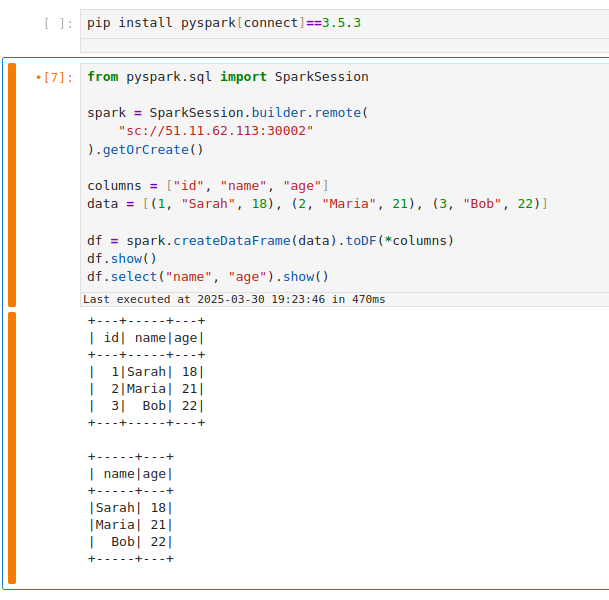
Using a Service has the benefit of a stable name – you don't need to know the exact pod name or IP after it's set up. It also allows you to change the backing pod (e.g., restart the Spark Connect job) without changing how clients connect (as long as the new pod has the same label).
If your Service selector matches multiple Spark Connect pods, client requests can be routed inconsistently. A Kubernetes Service will load-balance connections among all matching pods. This means if you accidentally run two Spark Connect jobs with the label प्रकार = स्पार्ककनेक्ट, a client might connect to either one (potentially different sessions each time). To avoid issues, ensure only one Spark Connect pod is behind a given Service, or use unique labels (and Service names) per instance. In cases where you need to scale Spark Connect horizontally, be aware that each client session is bound to a single server; multiple servers won't share session state.
सफाई कार्य
अपने Spark Connect सत्र (सत्रों) के साथ काम पूरा करने के बाद, संसाधनों को मुक्त करने और अनाथ कनेक्शन से बचने के लिए निम्न क्लीनअप चरण निष्पादित करें:
-
Stop the Spark Connect Job: In the Ilum UI, navigate to the running Spark Connect job and click रुको नहीं तो समाप्त. This will shut down the Spark Connect server process on the cluster. Confirm that the job's status changes to stopped/finished. (If you forget this step, the Spark Connect server will keep running and occupying cluster resources, impacting your spark application performance.)
-
Terminate Port-Forward Sessions: If you used
Kubectl पोर्ट-फॉरवर्ड, go to the terminal where it's running and pressCtrl+Cपोर्ट-फ़ॉरवर्डिंग समाप्त करने के लिए। यह सुरंग को बंद कर देता है और आपके स्थानीय बंदरगाह को मुक्त कर देता है। यदि आप पृष्ठभूमि में पोर्ट-फॉरवर्ड चलाते हैं, तो उस प्रक्रिया को मारना सुनिश्चित करें। -
Delete Kubernetes Service (if created): If you exposed a Service for Spark Connect, remove it when it's no longer needed. You can delete it with:
kubectl delete सेवा स्पार्क-कनेक्ट-सेवा -n चूकबदलें
स्पार्क-कनेक्ट-सेवाand namespace as appropriate. This ensures you don't leave an open network endpoint in the cluster. (If you set up a LoadBalancer, deleting the Service will also release the external IP/port. If you used a NodePort, it frees that port on the nodes for other uses.)
सफाई करके, आप सुनिश्चित करते हैं कि आपके स्पार्क कनेक्ट उपयोग से संबंधित कोई आवारा प्रक्रिया या पोर्ट खुला नहीं छोड़ा गया है, जो आपके स्पार्क क्लस्टर पर संसाधनों का अनुकूलन करता है।
Troubleshooting Spark Connect Issues
Here are solutions to the most common errors when connecting to Spark on Kubernetes.
How to fix "Connection Refused" on port 15002?
If your client fails with ConnectionRefusedError नहीं तो UNAVAILABLE:
Cause: The client cannot reach the Spark Driver pod. This is usually a networking issue, not a Spark issue.
विलयन:
- Check Job Status: Is the job actually
RUNNINGमें इलम यूआई? - Check Network Access:
- If you are outside the cluster (e.g., local laptop), you cannot use the Pod IP directly. You must use
Kubectl पोर्ट-फॉरवर्ड(Method 3) or a NodePort/LoadBalancer Service (Method 4).
- If you are outside the cluster (e.g., local laptop), you cannot use the Pod IP directly. You must use
- Verify Port: Ensure you are connecting to
15002(Spark Connect), not4040(Spark UI). - Test Connection: Run
nc -vz localhost 15002(if using port-forward).
How to resolve "Name or service not known" (DNS Error)?
Cause: Your local machine doesn't know how to resolve Kubernetes internal DNS names like job-xyz.default.pod.cluster.local.
विलयन:
- Option A:प्रयोग
Kubectl पोर्ट-फॉरवर्डand connect tosc://localhost:15002. - Option B: Connect using the Pod IP directly (only works if you are on the same VPN/VPC).
- Option C: Configure your local
/etc/hoststo point the DNS name to 127.0.0.1 (combined with port forwarding).
How to fix "Pod not found" during port-forwarding?
Cause: Spark Driver pods are ephemeral. If you restart the job, the pod name changes (e.g., from job-abc-driver तक job-xyz-driver).
विलयन:
- Always check the current driver pod name in the Ilum UI or via
kubectl get pods -l spark-role=driver. - एक का उपयोग करें सेवा (Method 4) to get a stable hostname that doesn't change between restarts.
Error: "Client version mismatch" or "Unsupported Protocol"
Cause: You are trying to connect a Spark 3.4 client to a Spark 3.5 server (or vice versa).
विलयन: Check your client version:
pip show pyspark
It must match the Ilum cluster version (e.g., both must be 3.5.x).
Error: "ModuleNotFoundError: No module named 'grpc'"
Cause: The grpcio-status library is missing. It is a required optional dependency for Spark Connect.
विलयन:
pip install grpcio-status
इस गाइड का पालन करके, आपको सक्षम होना चाहिए Ilum पर एक स्पार्क कनेक्ट सर्वर कॉन्फ़िगर करें और विभिन्न तरीकों से इससे जुड़ें। Ilum UI स्पार्क कनेक्ट इंस्टेंस को तैनात करना आसान बनाता है, और उपरोक्त तकनीकों के साथ, आप इसे एक्सेस कर सकते हैं चाहे आप कुबेरनेट्स क्लस्टर के अंदर हों या दूरस्थ रूप से काम कर रहे हों। हैप्पी कनेक्टिंग!